STOP FORGETTING
YOUR PRs
HotBot tracks your open PRs and posts a daily summary to Slack, Discord, or Teams. Your team sees what needs review before standup - no more "did anyone look at my PR?"


PR TRACKER
Live PR status in your channels - one message per PR that updates in real-time
One message per PR. Always up-to-date.
WORKS WITH YOUR TOOLS


THREE STEPS. FIVE MINUTES.
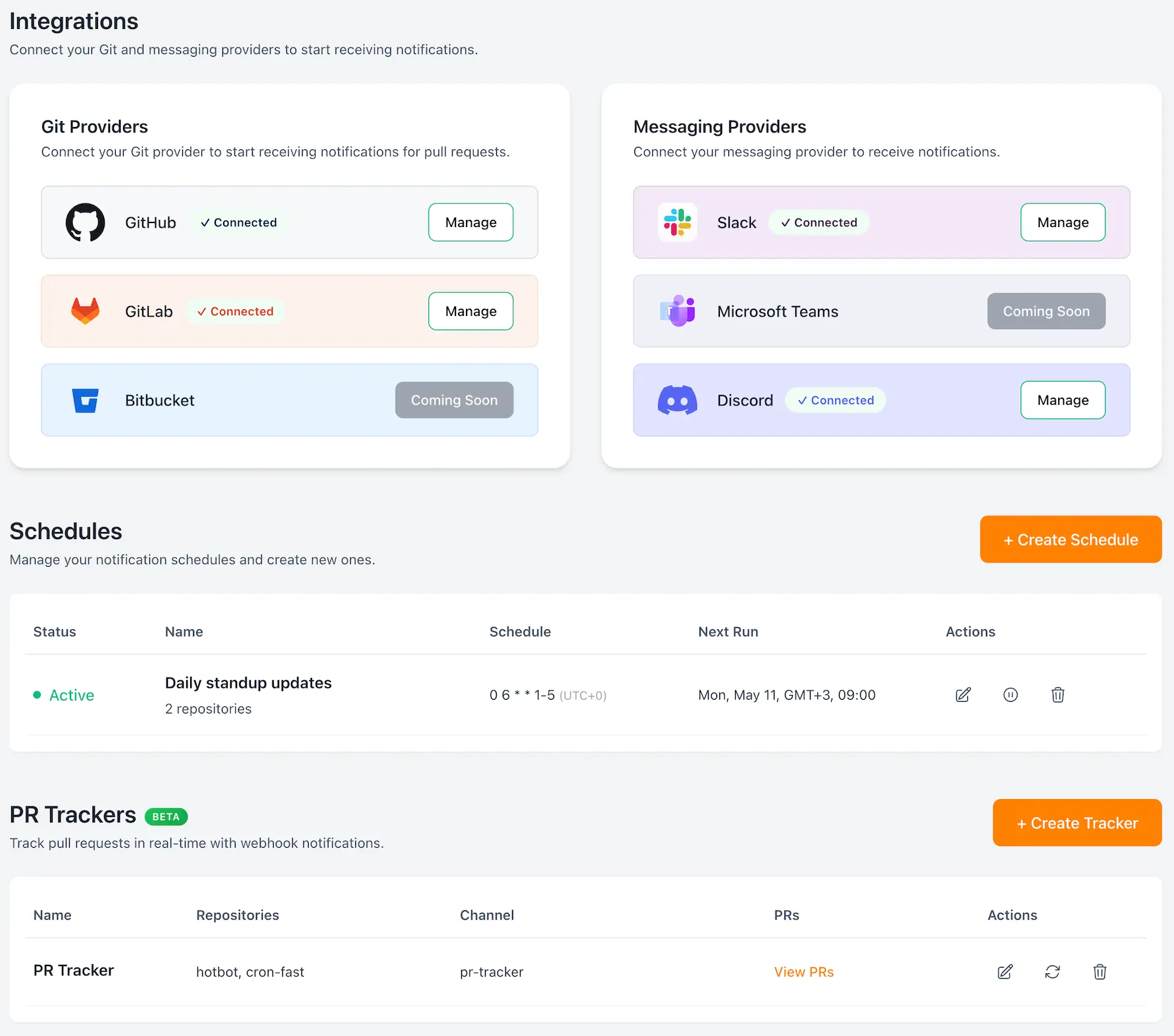
Connect Git repos
Link your repositories and grant necessary permissions for PR monitoring.
Pick channels and standup time
Choose Slack channels and set your team's preferred notification schedule.
Enable escalation rules
Configure smart escalation thresholds and stakeholder notifications.


BUILT FOR TEAMS WHO HATE STALE PRs
Why we built HotBot
We kept forgetting to review each other's pull requests. Daily Slack digests became part of our morning routine - check what needs review, done. We built HotBot so your team can do the same.
Want to share your experience?
We'd love to hear how HotBot is working for your team. Drop us a line and we might feature you here.
SHIP FASTER BY UNBLOCKING REVIEWS.
Stop losing momentum to forgotten PRs. HotBot keeps your team's code flowing with automation that respects your workflow.
Daily PR summaries before standup
Get a complete picture of pending reviews delivered to your team channel every morning. No more "what needs review?" questions in standup.
Targeted nudges, not noise
Smart filters exclude drafts, WIP PRs, and already-reviewed code. Only get notified about PRs that actually need your attention.
Configurable escalation
Set custom thresholds for when to escalate stale PRs to team leads or managers. Maintain team harmony while ensuring nothing gets stuck.
DESIGNED TO BE READ IN SECONDS AND ACTED ON IMMEDIATELY.
WHY HOTBOT VS. ALTERNATIVES?
See how HotBot compares to other solutions your team might be considering
Excludes drafts, WIP, already reviewed
Daily digest for entire team
Automatic escalation to team leads
Time to get up and running
Ongoing effort to keep working
HotBot vs GitHub Notifications
RecommendedHotBot vs Manual Solutions
RecommendedGIVE IT A SHOT
Free tier available. Connect a repo, pick a channel, see if it helps your team.
TRY IT FREE →PAY WHAT YOU WANT (KINDA)
Start free, scale as you grow. No per-user fees, no surprise charges.
Free
Perfect for small teams getting started
- 3 active repositories
- 1 messaging provider
- 2 notification schedules
- Community support
PR Tracker (Beta) is available on Pro plans with up to 3 trackers. Enterprise plans get unlimited trackers.
MADE FOR ENGINEERS
Daily standup summaries
Schedule PR digests via cron to land in your team channel before standup. Everyone sees what needs review without asking.
Smart filters that cut noise
Automatically exclude drafts, WIP PRs, and already-reviewed code. Filter by labels, title keywords, or author to surface only PRs that need attention.
Escalation tiers with stakeholder mentions
Define escalation chains from reviewer to team lead to manager. Set per-repo thresholds so stale PRs get the right eyes on them.
Zero-noise defaults, configurable thresholds
Sensible defaults out of the box - no setup required. Tune every setting when your team needs finer control.
QUESTIONS YOU'LL ASK
What Git providers and messaging platforms does HotBot support?
HotBot integrates with GitHub and GitLab for source control, with Bitbucket coming soon. For notifications, it supports Slack, Discord, and Microsoft Teams. Connect multiple repos and channels from any combination of providers.
What permissions does HotBot need?
Only read-only access to repository metadata and PR information. We never access your actual code, and all data is encrypted in transit and at rest.
How quickly can we get started?
Setup takes about 5 minutes. Connect your GitHub/GitLab account, add HotBot to your Slack/Discord/Teams, configure your first notification schedule, and you're done. No technical setup required.
Will HotBot spam my team with notifications?
No. HotBot sends one daily digest (or your custom schedule) instead of per-PR notifications. Smart filters exclude drafts, WIP, and already-reviewed PRs. Most teams see 90% less noise than native GitHub notifications.
How does HotBot control notification noise?
Smart defaults exclude drafts, WIP PRs, bot-generated content, and already-reviewed PRs. You can customize filters by labels, file paths, authors, and more. Most teams see 90% less notification noise.
How does HotBot track PRs in real-time?
HotBot uses webhooks from your Git provider to monitor PR status changes instantly. Your daily digest shows the latest state of each PR - no stale data. Webhooks also enable smart escalation when PRs sit too long.
How customizable are the escalation rules?
Fully customizable. Set different thresholds for different repos, exclude certain labels or authors, define escalation chains (reviewer → team lead → manager), and customize timing for each step.
What if we need to cancel?
Cancel anytime with one click. No contracts, no cancellation fees. Your data is exported and deleted within 30 days.
STILL HAVE QUESTIONS?
Our team is here to help you get the most out of HotBot.